Next Js Explained: Rendering, Architecture, and Practical Use Cases
next js is a React framework for building production websites and web applications with routing, server rendering, data-fetching patterns, caching, and deployment conventions in one application structure. In 2026, it is a strong fit for company websites, SaaS platforms, dashboards, e-commerce experiences, and AI-enabled products when a team wants React flexibility without assembling every web concern from scratch. The right choice depends on your content, interactivity, data boundaries, hosting model, and team skills—not on the framework’s popularity alone.
What Next.js is and what it adds to React
React primarily gives a team a component model for building user interfaces. Next.js builds around that model with application-level conventions: URL routing, layouts, server and client components, metadata, image handling, data access patterns, and production deployment options. That distinction matters when a business is commissioning more than a single interactive screen.
A React interface can be embedded into an existing application or assembled with other tools. A Next.js application provides a broader map for how pages and features fit together. Its current App Router uses file-system conventions, nested layouts, loading states, error boundaries, and server-side capabilities. The official documentation describes Next.js as a React framework for building full-stack web applications, which is a more useful mental model than calling it merely a “faster React.” See the official Next.js documentation for the framework’s current scope and conventions.
Framework versus library
A library usually lets you decide the surrounding architecture. A framework makes more decisions for you, which can reduce setup work but also creates conventions your team must learn. Next.js does not remove architectural decisions; it moves them into defined choices such as:
- App Router or another routing approach: new products commonly evaluate the App Router, while existing systems may have an older structure that requires staged migration.
- Server or client execution: a page can fetch data on the server, while a smaller interactive component runs in the browser.
- Static, dynamic, or revalidated output: content can be generated ahead of a request, rendered per request, or refreshed according to application rules.
- Managed or self-managed deployment: the hosting target affects caching, background work, environment variables, and observability.
For a marketing website, this can mean a content-heavy page is rendered close to the request boundary while a quote calculator remains interactive in the browser. For a SaaS product, it can mean a server-rendered account shell surrounds client-side charts and filters. The value is not that every component becomes server-rendered; the value is that the team can assign each responsibility deliberately.
Why Next.js matters for business and product teams
The business case is usually about delivery risk and user experience, not framework branding. A website redesign, customer portal, or AI workflow often combines public content, authenticated data, forms, third-party services, and evolving UI requirements. A consistent application structure makes those boundaries visible earlier.
It supports different page needs in one product
A business website may need indexable service pages, a fast landing page, a CMS-driven newsroom, and a logged-in partner area. Those pages do not have identical rendering requirements. A product team can use server-rendered output for content and access-controlled data, then reserve browser JavaScript for interactions that actually need it.
This can improve the JavaScript budget and simplify the first response, but it is not an automatic performance guarantee. A page can still be slow because of oversized images, slow database calls, excessive client components, blocking third-party scripts, or an inefficient API. The framework gives you mechanisms; the implementation determines the result.
It can align frontend work with backend boundaries
For a dashboard, the server can retrieve the current organization and permissions before rendering the page, while interactive filters update the visible data in the browser. For an AI-enabled workflow, the server can keep provider credentials private, validate the user’s request, call the model, and stream or return an approved result to the interface. This separation is useful because secrets and authorization belong on the server, not in browser code.
React’s official reference documents the distinction between components and hooks that participate in rendering, state, and effects; those concepts remain the foundation underneath Next.js. A team evaluating the framework should therefore understand both layers rather than treating Next.js as an unrelated replacement for React. The React reference documentation is the authoritative starting point for those underlying primitives.
For organizations comparing agencies, ask for an architecture that explains:
- which pages are public, authenticated, or role-restricted;
- which data is allowed to be cached and for how long;
- where integrations and model calls execute;
- how errors, loading states, and empty states appear to users;
- how the team will measure real-user performance after launch.
Those questions are more diagnostic than asking whether a supplier “uses Next.js.” A capable implementation can still be a poor fit if the team cannot operate the hosting environment, test data access, or maintain the chosen rendering model.
How Next.js works: routing, rendering, and data
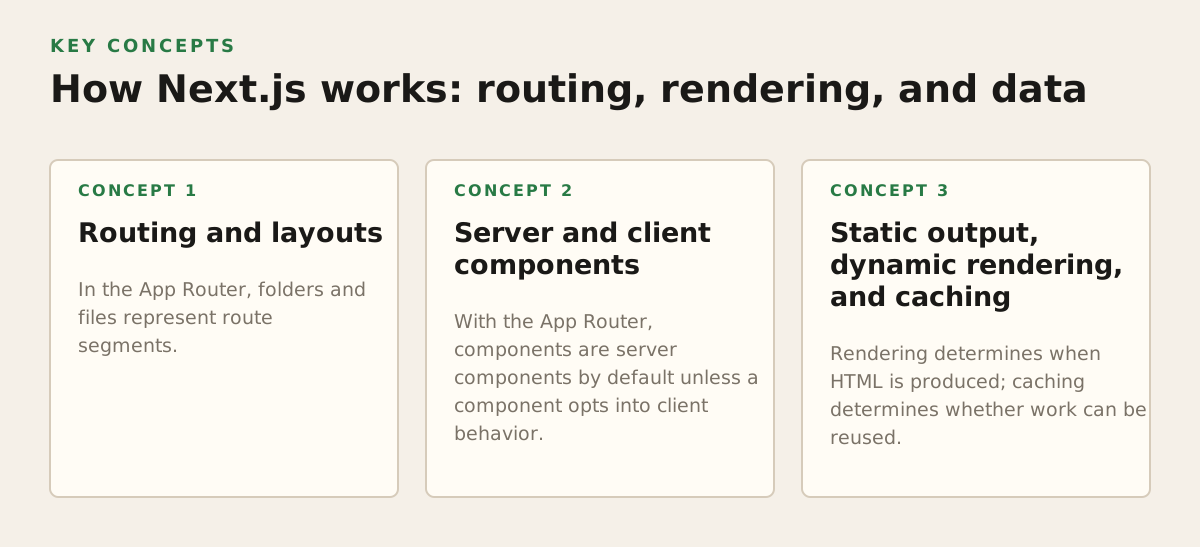
Next.js becomes easier to reason about when you separate three concerns: what URL is requested, where the component executes, and when data is obtained or reused. These choices interact, but they should not be treated as one setting called “SSR.”
Routing and layouts
In the App Router, folders and files represent route segments. Shared layouts can preserve a common shell such as navigation, account context, or a product sidebar while child routes change. Loading and error boundaries allow a team to design what users see during slower operations instead of leaving a blank screen.
A plausible SaaS structure might separate:
/for public acquisition pages;/pricingand/resourcesfor content and conversion;/appfor authenticated product functionality;/app/projects/[projectId]for a project-specific workspace;/apior server-side functions for controlled integration boundaries.
The exact folder names are implementation details. The important decision is whether the URL model mirrors the product model. A dashboard that hides all features behind one generic route may be harder to index, test, authorize, and analyze than one with explicit route boundaries.
Server and client components
With the App Router, components are server components by default unless a component opts into client behavior. Server components can reduce the amount of interactive code sent to the browser and can access server-side resources through an appropriate data layer. Client components are needed for browser APIs, local interaction state, event handlers, and components whose behavior must respond immediately to user input.
Next.js explains this model in its documentation on server components. The practical rule is not “avoid client components.” It is keep the client boundary as small as the interaction allows. A date-picker may need client execution; the entire page containing that date-picker may not.
For example, an operations dashboard could render the account name, permissions, table headings, and initial rows on the server. A client component could handle column sorting and filter controls. If filtering requires fresh authoritative data, the interaction can call a protected server endpoint rather than exposing database credentials or internal service details.
Static output, dynamic rendering, and caching
Rendering determines when HTML is produced; caching determines whether work can be reused. A public “About” page may be suitable for static generation. A personalized invoice page may require request-specific authorization. A knowledge base may be regenerated when content changes rather than on every visit.
These are different requirements:
- Static generation: useful when the result is shared and changes infrequently.
- Dynamic rendering: useful when the response depends on the request, identity, or fresh external data.
- Revalidation: useful when a shared result can remain valid for a defined period or be refreshed after an event.
- Client fetching: useful for frequently changing or highly interactive data after the initial page has loaded.
Do not describe a product as “real-time” simply because its browser fetches data after load. Define the required freshness, consistency, and failure behavior. A sales dashboard that tolerates five-minute-old aggregate data has a different architecture from a dispatch screen that must reflect new assignments immediately.
Where Next.js breaks down or becomes the wrong fit
Next.js is not a shortcut around product complexity. The same flexibility that supports many use cases can create confusing boundaries if a project has no ownership model. The main risks concern operational complexity, cache correctness, and teams choosing abstractions they cannot maintain.
Rendering is not a substitute for performance engineering
Server-rendering a page does not guarantee a fast experience. The server may wait on a slow CMS, make several sequential database calls, or produce a large response. The browser may then download heavy fonts, analytics, charts, and UI libraries. Performance work still requires measurement at the network, server, and browser layers.
For search visibility, Google’s documentation says JavaScript applications need to make content accessible to Googlebot and recommends checking how pages are rendered and indexed. Its JavaScript SEO basics should inform acceptance criteria for public pages, but indexing is not a promise of rankings. Clear content, internal links, accessibility, and useful page experience still matter.
Caching can create correctness bugs
A cache that serves the wrong organization’s data is not a performance issue; it is a security and correctness incident. Personalized responses, permissions, prices, inventory, and workflow status need explicit cache policies. Teams should document whether a response is public, user-specific, organization-specific, or uncacheable.
Common failure patterns include:
- caching a page whose output depends on a session cookie;
- showing stale permissions after an administrator changes a role;
- assuming a content update automatically invalidates every related page;
- letting a third-party API timeout block the whole page;
- putting provider keys or privileged queries into client-delivered code.
Another poor fit is a team that only wants a small embedded widget. If the requirement is one calculator inside an established CMS and the surrounding application already has reliable routing and deployment, introducing a full framework may add unnecessary migration work. Conversely, if the project is already becoming a multi-route product with authentication, integrations, and evolving UI, avoiding a framework can create its own long-term cost.
How practitioners apply Next.js to real projects
The strongest implementations begin with user journeys and data boundaries, not with a template repository. A website redesign, SaaS platform, and internal dashboard may all use Next.js while requiring very different delivery plans.
A practical architecture exercise
For each important screen, record the following before development:
- Audience and authorization: identify who may view or change the information.
- Freshness: define whether data can be minutes old, must update after an action, or must be fetched for every request.
- Interaction: mark the controls that need browser state, event handlers, or device APIs.
- Failure mode: decide what happens when the CMS, payment service, CRM, or AI provider is unavailable.
- Measurement: choose page-load, conversion, task-completion, or operational metrics that can validate the result.
An illustrative starting policy for a small B2B product—not a universal benchmark—might classify 12 public content pages as shared and cacheable, 5 account pages as authorization-sensitive, and 3 workflow actions as server-controlled mutations. That simple inventory is more useful than calling the whole product “SSR,” because it exposes where caching, authentication, and error handling need separate decisions.
Use a staged delivery plan
A sensible build sequence reduces the risk of discovering architectural problems after visual design is complete:
- Stage 1: product and content model: map routes, roles, integrations, SEO requirements, and content ownership.
- Stage 2: vertical slice: implement one complete journey, such as landing page to signup or dashboard to saved report.
- Stage 3: data and security review: verify authorization, validation, secret handling, error states, and cache behavior.
- Stage 4: performance and accessibility pass: inspect real route output, image sizes, keyboard flows, loading behavior, and third-party scripts.
- Stage 5: operating model: document deployment, environment variables, logs, alerts, content releases, and rollback procedures.
For a public website, information architecture and content quality may deserve more attention than sophisticated client state. For a SaaS platform, permissions, auditability, background jobs, and resilient integration handling may dominate the work. For an AI product, the central concerns include prompt and model versioning, cost controls, input validation, privacy decisions, human review, and graceful fallback when a model response is incomplete.
Design and engineering should stay connected throughout this process. A clear component system can reduce inconsistent states across marketing pages and product screens, while a deliberate web design system prevents responsive behavior from being decided one page at a time. Teams planning a redesign can review web dizajn Zagreb before translating screens into route and component boundaries.
When to choose Next.js for your next build
Choose Next.js when the product needs a React-based interface plus several of the following: public pages that benefit from server-delivered content, multiple routes and layouts, authenticated application areas, controlled server-side integrations, a shared component system, or a team prepared to own deployment and caching decisions.
Consider another approach when the project is a tiny static site with no application behavior, a single embedded widget, or an organization that cannot support the framework’s server and deployment model. “Another approach” does not automatically mean inferior; fit depends on the required user journeys and the team’s operating constraints.
Before approving an implementation, require concrete answers to these questions:
- Which routes are public, personalized, and role-restricted?
- Which components run in the browser, and why?
- What data can be cached, for whom, and for how long?
- How are mutations validated, authorized, retried, and audited?
- What happens when a CMS, payment provider, CRM, or AI service fails?
- How will search visibility, accessibility, performance, and analytics be verified after launch?
For a European business planning a new website or product, the framework decision should follow those answers rather than precede them. Adapt IT can help translate the decision into information architecture, UI/UX, frontend and backend implementation, and AI-enabled product workflows. If you are evaluating a new build or redesign, start with izrada web stranica u Zagrebu and bring the route, data, and ownership questions into the technical scope.
Authored with NotFair SEO